My Personal Kanban, new tiny application just released

I’ve posted about Kanban before (Free Kanban Board , Kanban), however this time I’ve created a little Kanban Board application that I started to use as my personal, sophisticated TODO list.

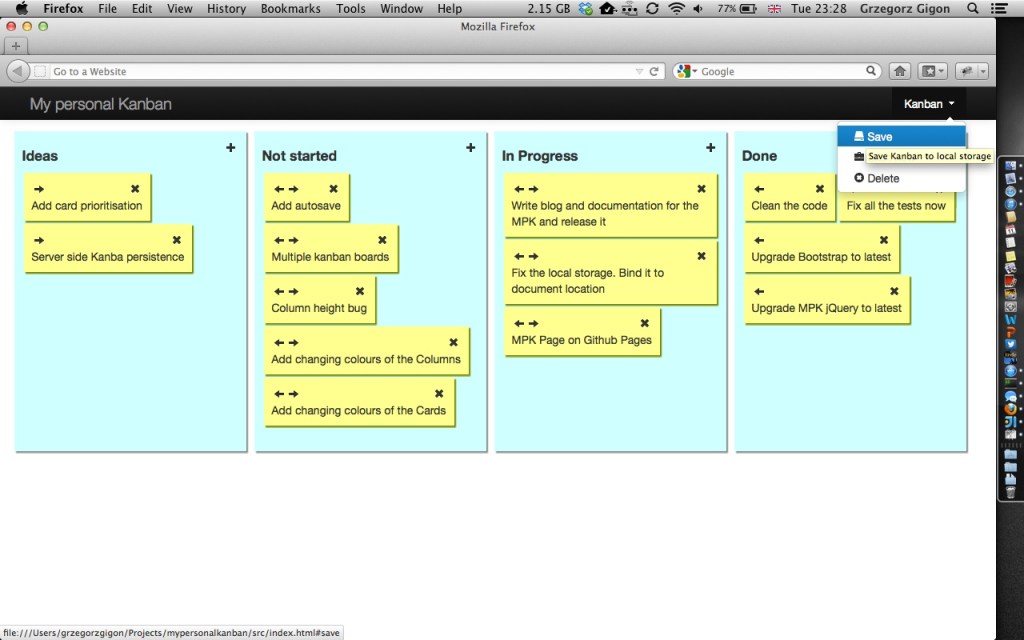
My Personal Kanban Screen
Example of a Board

My Personal Kanban is Free and Open Source for anyone to use.

More description of it’s functionality can be found here: http://greggigon.github.io/my-personal-kanban/ and the source code in here: https://github.com/greggigon/my-personal-kanban

Groovy Map to Json String converter

I use Groovy a lot. It’s simple and easy to use, runs on JVM and saves me from Java verbosity. I also like the fact that it’s dynamic.

I use it with a simple Servlet to return data to JavaScript AJAX requests. I like to keep the server side very simple, so I don’t create a lot of POJOs and I’m using HashMaps instead. Groovy has few convenient methods that makes it easy to work with Maps.

I do convert the maps into JSON when returning results to a browser. I don’t use anything fancy, just a couple lines of Groovy code to do that.

class JsonMap {
def toJSON(elements, depth = 0) {
def json = ""
depth.times { json += "\t" }
json += "{"
elements.each { key, value ->
json += "\"$key\":"
json += jsonValue(value, depth)
json += ", "
}
json = (elements.size() > 0) ? json.substring(0, json.length() - 2) : json
json += "}"
json
}
private def jsonValue(element, depth) {
if (element instanceof Map) {
return "\n" + toJSON(element, depth + 1)
}
if (element instanceof List) {
def list = "["
element.each { elementFromList ->
list += jsonValue(elementFromList, depth)
list += ", "
}
list = (element.size() > 0) ? list.substring(0, list.length() - 2) : list
list += "]"
return list
}
(element instanceof String) ? "\"$element\"": element?.toString()
}
}
view raw JsonMap.groovy hosted with ❤ by GitHub
class MapToJsonTests extends GroovyTestCase {
private final def mapper = new JsonMap()
void test_convertMapWithListsOfMapsIntoJSON() {
def map = ["a": "a", "b": [["b": "a"], 'd', [12, 12, "e"], ["r": 12]]]
def expected = '''{"a":"a", "b":[
\t{"b":"a"}, "d", ["12", "12", "e"],
\t{"r":"12"}]}'''
def result = mapper.toJSON(map)
assert expected == result
}
}

With this code there is quite a bit of assumptions though:

  • it will only work for Map
  • it assumes Strings are used as Map Keys
  • it will convert Maps, Lists and Objects
  • when it meets Object it will call .toString() on it to get it’s value
  • it will try to format it with tabs and new lines a bit, so it’s more pleasant for the eye and human readable

Hope it would be useful for you. Greg

Free Kanban board on Mac with no additional software

I’m a big fan of Kanban board. I prefer it over TODO list for all my professional and personal work.  It’s clear to understand, doesn’t require extensive management process and most important offers great visibility of work.

I’m not going to focus on Kanban itself. If you want to read more about it I would refer you to few external links for more info:

Example of a simple Kanban board

What I would like to focus on is how to do a cheap Electronic Board on Apple Mac without any additional software installed.

What you need?

If you got Mac you don’t really need anything more. I’m running OS X 10.8.3.

To make the Kanban board I used application shipped with OS X called Stickies and a custom made desktop backgrounds.

How to do it?

First of all, I’ve created a new Desktop using Mission Control and setup Desktop Background to my Custom “Kanban Board like” wallpaper.

Adding new desktop in the Mission Control

I’ve prepared two backgrounds, dark and bright, which you are more than welcome to use for free.

Kanban Board - Desktop background - Dark
Kanban Board – Desktop background – Dark
Kanban Board - Desktop background - Light
Kanban Board – Desktop background – Light

My empty board is ready. All I need to do now is to add some Stickies onto it.

Background with Stickies

Voila. You can modify color of a sticky and make it transparent. I’m using colors to distinguish between different types of tasks. Stickies on the top are the one with top priority.

Once your Done column is full you can archive your Stickie by saving it and removing from the board.

Simple as that I hope you’ll find it helpful and easy to use. Greg

Inbox Zero – 3 years of happy email

Today is roughly 3 years since I’ve decided to sort out my email. Both, my personal email and my work email. I’ve decided to go 100% Inbox Zero. No exceptions.

Inbox zero

Why?

I had a massive inbox full of stuff. I’m using Gmail for my personal mail and the Exchange and MS Outlook at work. Thanks to Google’s never ending storage I never removed a single mail from my inbox. It was the same at work. It started to bother me at some point for number of reasons.

  1. I took me a moment to find things I was looking for
  2. I was annoyed with the mess and the number of things in my inbox
  3. I couldn’t organise myself based on my email inbox. Couldn’t decide what to do next.

About the same time I started to think of my problem I stumbled upon the concept of Inbox Zero.

How I’ve done it?

First thing was to actually reduce the amount of received emails.
Unsubscribing from useless marketing stuff and newsletters I never read and was never interested in.

I’ve created Labels in GMail and filters in Outlook to put less important informative things (like interesting newsletters, Bank statements, some billing info) into folders. This information is there, separately from the other stuff and I can easily get to it by navigating to a folder.

Last step was to archive everything else. This left my Inbox totally empty.

Ongoing maintenance?

Quite simple.
When I received something I was not interested I either tried to unsubscribe or mark it for my spam filter.

All the filters took care of putting interesting but unimportant mails into folders.

Every email I received become immediately my TODO email. I either answered it immediately or as soon as I could. As soon as I took an action I could archive the email and forget about it.

Summary

I find few advantages of having no emails in inbox.
The fact that my inbox is empty when I navigate to it leaves me with the peace of mind. I know that all the necessary actions I should be taking, I’ve done and I don’t need to worry about it.

Email is no longer only a way of communicating, it’s also a way for organising myself. I do actually send myself an email as a reminder of things I need to do. After three years of doing Inbox Zero, I know I will make sure that I will get to it as soon as I can so the inbox could stay empty again.

Lastly, the fact that there is nothing in the inbox and the fact that my Email TODO list is clear makes me feel good, gives me a motivational sense of accomplishment. That alone is an incentive for the Inbox Zero.

Using Atlassian Stash pull requests for mandatory code reviews

During my early years of software development I used to think of Code Reviews as a necessary bureaucratic monster, process designed to stop me from delivering the value and focus on pointing out mistakes.

My outlook at it has changed. There are many benefits of code reviews. Some of them that are more important for me:

  • increases quality of code therefore improves maintenance
  • facilitates sharing of the information and knowledge with fellow developers
  • improves my coding skills thanks to feedback

At RBS we are using Subversion and GIT as our SVC tools. We are using Stash to manage our repositories. Stash has a very useful features that could help setup the code review as a mandatory process, before the code is merged into the main branch. In this post I would like to show you how to set it up and how to use it.

Use case for code reviews

The use case for the Mandatory code review is taken from a real case brought at my work by one of the teams. The team was typical, Technical Lead, Senior Devs and Junior Devs. They wanted to leverage the Code Review goodness for learning.

What the users wanted to do is:

  • allow only specific users to be able to modify code in Master branch of GIT repository
  • allow everyone else on the team to create their local branches and push those branches into remote repository
  • have the ability to raise a code review of changes made on a user branch before merging the changes into the Master
  • have the ability to comment, decline the changes
  • once the changes were accepted to allow anyone with enough permissions to merge the code

You might notice similarity in that process to the one that is quite common in the Open Source community and was championed by GitHub, called Pull-Request (on a side note, this site is great EpicPullRequests).

Preparing repository for code reviews (or for Pull Requests)

First thing to do would be to make sure that all the people in your team are Contributors to a project. I have a group of users in Stash called superheroes. I need to set them as a Contributors on my project.

My user group Superheroes setup in Stash
Project level permission settings

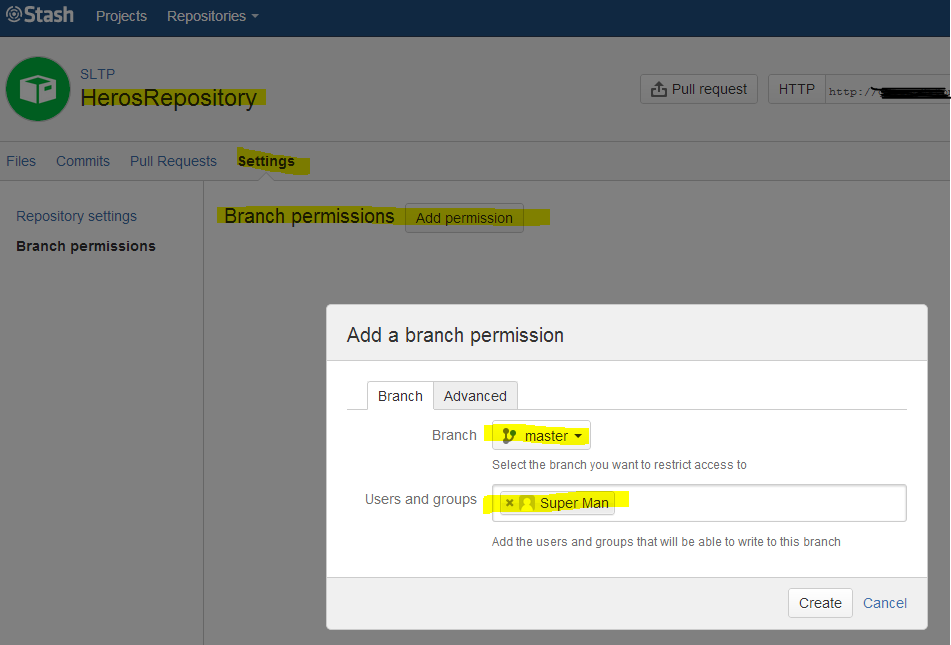
What I’ve done above means that everyone superhero in the group would be able to contribute to the project. The next step will restrict the changes on Master branch and allow it only for a specific user (in our case, Superman).

Adding branch permissions for Superman to a Master

The above action will result in only Superman being able to make any changes on Master.

Batman trying to push into Superman repository and fails

What would Batman do?

For Batman (the user that is restricted on Master but allowed on Project level) to be able to work he needs to work on a branch, push that branch into Stash and create a merge request (Pull request).

Batman working on a Batmobile feature on it's own branch. Pushing to remote repository after the work is done
Batman working on a Batmobile feature on it’s own branch. Pushing to remote repository after the work is done

Creating the Pull Request

When Batman finished working on the feature he would like to Batmobile to become mainstream and be adopted by all Superheroes. What he needs to do is to merge hist feature into the Master branch. We know already that he cannot do it as someone need to review his changes. In our case it’s the Superman.

Batman creates a Pull Request.

Batman Creates a pull request for his changes to be merged into Master. The selected reviewer is Superman

What Superman will see once he is logged into Stash he can review the Pull Request, approve them, decline, comment, etc.

Screen that Superman see when he reviews Barman's pull request
Screen that Superman see when he reviews Barman’s pull request

Once the request is approved, Superman or anyone else with the permissions to modify Master can merge it.

Possibly worth to mention the fact that it is possible for anyone to review the changes as it is possible for Batman to request anyone to be the reviewer, however, only the users with enough privileges will be able to merge the changes.

Superheroes conclusion

The above setup leverages the feature of Branch Permissions in Stash. Anyone who would like for changes to be merged into the Master branch will need to go through Code Review.

Wishing you many happy reviews and much more learning.

How to use Gradle Wrapper to build project in TeamCity inside enterprise network

Gradle is a great tool for building projects. I’m using it to build Java and Groovy modules. TeamCity is a Continuous Integration server that many teams are using in RBS.

We have a rather large farm of build agents. Some of them are specifically build to suit various build requirements (for example OS, or Browser version). However, majority of the Agents are generic and could be used by any build and project.

By default we don’t have Gradle distribution installed on those TeamCity agents. TeamCity doesn’t come with bundled version of Gradle either. We could install versions of Gradle on the Agents, however it’s impractical due to the number of the Agents and the fact that there is many distributions of Gradle that could be required.

Solution to that problem could be Gradle Wrapper. Gradle Wrapper contains few files that you should include as a part of your project.

In this article I will introduce Gradle Wrapper, how to use it and how to set it up in TeamCity so it works behind firewall/proxy in enterprise network.

IntelliJ Project view with Gradle Wrapper files

The main role of wrapper is to Download distribution of Gradle and execute the build independently of the platform.

The interesting bit is that you can use Gradle to generate those files.

Creating Gradle Wrapper files

The Gradle Wrapper files could be copied from another project or generated using Gradle Wrapper task.

task prepareWrapper(type: Wrapper) {
   gradleVersion = '1.4'
}

The above lines show how to create the wrapper task in your project build.gradle file. There are number of properties that you can set. I will discuss those further. Documentation for those properties can be find at Gradle documentation page: http://www.gradle.org/docs/current/dsl/org.gradle.api.tasks.wrapper.Wrapper.html

Results of Execting Prepare Wrapper
Results of executing Prepare Wrapper

The task will generate folders and files that could be seen in the top picture of this post.

Using Gradle Wrapper 

You should be able to use Gradle Wrapper in the same way you use Gradle from your command line.

Using gradle wrapper script to list the tasks.
Using Gradle wrapper script to list the tasks.

When you execute the Wrapper for the first time it will download the distribution first (just as you can see on the picture above).

You could face first problem if you are inside a corporate network, behind a firewall and proxy.

Setting Wrapper to work behind Proxy

There are two ways you can address the issue:

  1. Setup proxy details on your Gradle Wrapper Script
  2. Provide Wrapper Distribution URL somewhere reachable within your corporate network

To setup proxy details you could modify gradlew and gradlew.bat files. Top of both files contain DEFAULT_JVM_OPTS system variable that you could set. For example:

#!/usr/bin/env bash

##############################################################################
##
##  Gradle start up script for UN*X
##
##############################################################################

# Add default JVM options here. You can also use JAVA_OPTS and GRADLE_OPTS to pass JVM options to this script.
DEFAULT_JVM_OPTS="-Dhttp.proxyHost=proxy.host.net -Dhttp.proxyPort=8080 -Dhttp.proxyUser=proxy.user -Dhttp.proxyPassword='awesome-password"

To provide alternative Gradle Distribution URL you can set it up before you generate Gradle Wrapper files in your task of the build.gradle file.

task prepareWrapper(type: Wrapper) {
   gradleVersion = '1.4'
   distributionUrl = 'alternative.location'
}

Or alternatively you can modify the gradle/wrapper/gradle-wrapper.properties file.

#Wed Feb 27 11:54:01 GMT 2013
distributionBase=GRADLE_USER_HOME
distributionPath=wrapper/dists
zipStoreBase=GRADLE_USER_HOME
zipStorePath=wrapper/dists
distributionUrl=http://some.location.net/gradle-distributions/gradle-1.4-bin.zip

The benefits of first approach is that you don’t need to host Gradle distribution anywhere within your network. The minus is when proxy requires authentication, you will need to put credentials in the file.

The benefits of a second approach is that you don’t need to modify gradlew script files and you don’t need to provide proxy user credentials. Also, distribution is hosted internally which potentially could mean faster downloads. The downside is the fact that you need to host it somewhere internally accessible via HTTP protocol.

Setting up TeamCity build

The task is relatively simple with only one hurdle to overcome. Once the Gradle Wrapped downloads the Gradle distribution, where does it actually put it, and where will the dependencies downloaded during build phase go.

TeamCity build setup page with Gradle Wrapper enabled

Note that I’ve not declared where are those directories that the downloads (Gradle distributions and build dependencies) will go. We can set this up in two places:

  1. gradle-wrapper.properties file
  2. TeamCity system property for the build

Setting the Wrapper Properties file

The gradle/wrapper/gradle-wrapper.properties file could be modified directly or setup during the prepareWrapper phase.

The prepareWrapper task:

task prepareWrapper(type: Wrapper) {
    gradleVersion = '1.4'
    distributionUrl = 'alternative.location'
    distributionBase='/some/location/on/agent/gradle'
    zipStoreBase='/some/location/on/agent/gradle'
}

The properties file:

distributionBase=/some/location/on/agent/gradle
distributionPath=wrapper/dists
zipStoreBase=/some/location/on/agent/gradle
zipStorePath=wrapper/dists
distributionUrl=http://some.location.net/gradle-distributions/gradle-1.4-bin.zip

Benefits of this approach is that you don’t have to configure anything specific in TeamCity. The downside is that you need to know in your script the details of Agent file system.

Setting the TeamCity system property

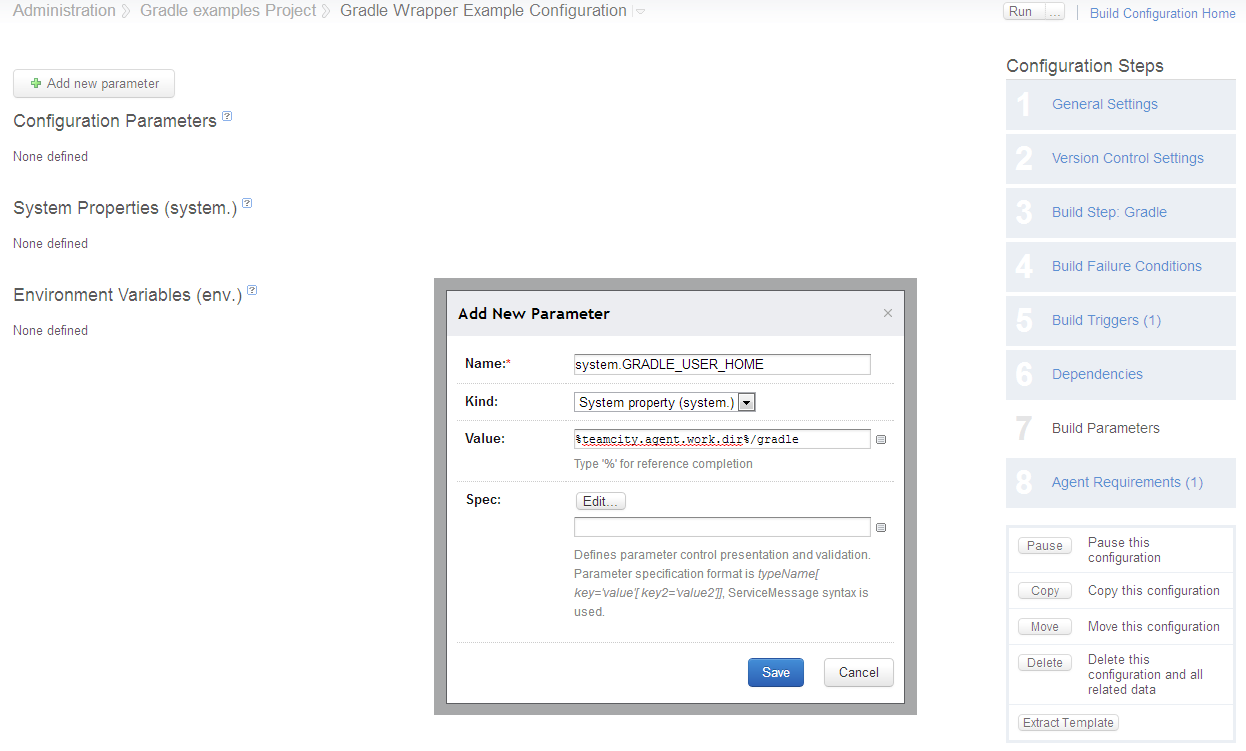
The system property to set should be the one referenced by gradle-wrapper.properties which is GRADLE_USER_HOME.

Example of TeamCity system property setup

At this point it is important to mention one thing: if the same GRADLE_USER_HOME is used within different builds, it could potentially save time on downloading Gradle distribution and build dependencies.

I wish you many happy builds.

Modelling Deployment Pipeline with JetBrains TeamCity

Deployment Pipeline is a concept of Continuous Delivery. In the simplest way possible explaining Deployment Pipeline I would say that it is an automated way of getting the software from version control into the hand of end user.

The process of getting the software from the version control such as Subversion or Git into the end user typically involves traveling through checkpoints. Those checkpoints (or steps) could be: Building the software -> Unit testing -> Automated acceptance testing -> Deployment into QA/UAT/Staging environment -> Manual QA -> Release into production.

Example of Software Delivery

Example process diagram for changes moving through the Deployment Pipeline.

For more detailed description of Deployment Pipeline I recommend this article http://www.informit.com/articles/article.aspx?p=1621865  from Continuous Delivery gurus (Jez Humble, David Farley).

No matter what is the process there is a need for tools to automate and support the Deployment Pipeline. This automation is typically handled by the Continuous Integration servers. Some of the CI server out there:

I’m going to take a closer look on the way TeamCity supports modelling the Deployment Pipeline.

How to setup TeamCity

Step dependencies

When designing the Deployment Pipeline it is very important to create number of steps reflecting delivery process that have dependency on a previous Steps (checkpoints) of the process. Among many features that TeamCity have, exists the one for adding Snapshot Dependency between different builds.

Picture below shows example of two TeamCity builds representing two steps in my project delivery.

Build dependencies

Build called Acceptance tests on Staging has dependency on Deploy to Staging.

What this mean in practice is that TeamCity will execute the Acceptance Test on Staging build only if there is a successful Deployment to Staging environment.

Triggering subsequent builds

Subsequent build could be triggered automatically when previous build in the Deployment Pipeline was successful. For example, in out configuration Automated Acceptance tests on Staging environment are triggered automatically as soon as deployment finishes.

This is achieved by setting up TeamCity build to be triggered on Finished build, just like in the next screen cap example.

Trigger

There are steps in the Deployment Pipeline that require and should be manually triggered. In our case the Deployment to Staging environment is manually triggered by user. This happens as we only want some versions and control when they are released into that environment. It is enough to remove any triggers from the Build Triggering configuration to make it manually triggered.

Viewing the build pipeline

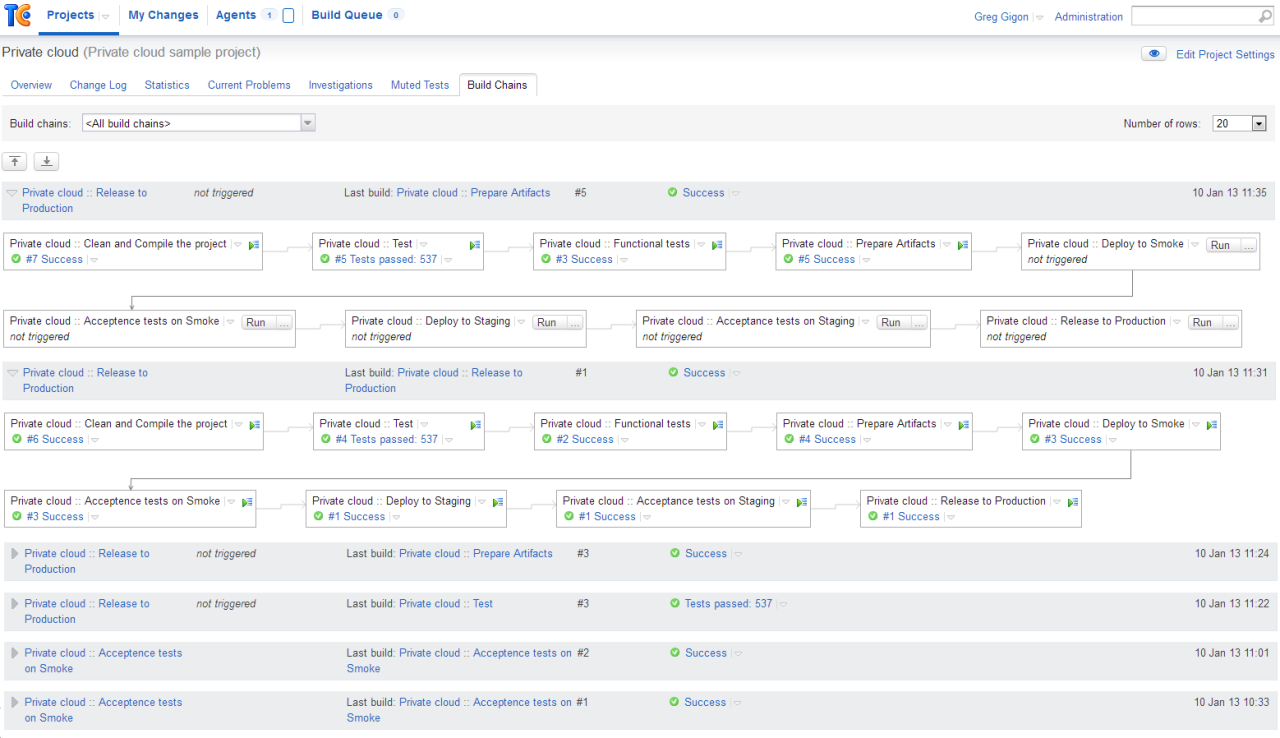
Latest version of TeamCity (I’m using TC 7.1.3) has a nice feature in the project view called Build Chains. It’s nothing else but a unified single view of dependent builds (Deployment Pipeline).

Example pipeline from my project:

Deployment pipeline

In our Deployment Pipeline, every commit of a code will trigger first build Clean and Compile the project. Pipeline stops at the deployment into smoke environment. Once confirmed the next station is a deployment into Staging. Final stop is the Release into production.

In our case the view of a build chain is the exact representation of our automated Deployment Pipeline.

Setting up Grails directories to NOT use default user home folder

I have my user home folder at work mapped to a network drive. It is incredibly slow. Unfortunately many applications use home folder as the default dumping ground. The same applies to Grails. It puts it’s cached files, ivy dependencies and who knows what else in there.

It is not a straight forward to change that location and to be honest, not very well documented.

Anyway, here is the best possible solution I managed to find on my Windows box:

  • in folder : %USER_HOME_FOLDER%/.grails create file called settings.groovy
  • in settings.groovy file add line: grails.dependency.cache.dir= “path/you/want” – this is for the Ivy downloaded cache dependencies
  • in settings.groovy file add line: grails.work.dir=”another/path”
  • a system variable called: GRAILS_AGENT_CACHE_DIR to another location you would like.

These settings made Grails stay away from my mapped network home folder.

Greg

TestNG NG, Next Generation of a runner for TestNG

I’ve been working with TestNG for 2 years now. The team that I work on made a decision to switch to TestNG thanks to one very important feature, @BeforeSuite and @BeforeClass. We are using Gradle as our build tool. Gradle supports TestNG tests execution.

With all the great features that TestNG comes with it also comes with features that could obfuscate test code readability. We also observed that there is no guarantee that the tests in the same class file will be executed together as a set.

With 25 minutes time of my train ride to/from work and determination to build something sweet and simple, I decided to create a Gradle plugin that will run TestNG tests in deterministic order, supporting only a small set of TestNG features.

I’ve made the code available here: https://bitbucket.org/gigu/testngng. The code is still work in progress, however there is already a functional Gradle plugin that can produce same style of XML reports as TestNG itself. There is also option of a Html report with simple and pretty style. I’ve written it in Groovy as I like Groovy. It’s Open and available to anyone.

Features supported by TestNGNG

  1. TestNGNG will recursively scan class folder passed in as parameter, in search of possible tests files. It treats this top-level folder a Suite.
  2. TestNGNG ENSURES all the tests in a class file are executed as a set of tests.
  3. TestNGNG will build a tree of tests and dependencies at the beginning of a run, before it executes a single test. The test tree is build in a form of a: One Test Suite -> Many Test Classes -> Many Tests.
  4. TestNGNG supports original TestNG annotations, it doesn’t have it’s own annotations as it is only a runner.
  5. TestNGNG support @Test annotation of a method or a class.
  6. It supports dependencies between test methods with:
    @Test(dependsOnMethods=”foo”)
  7.  It supports @BeforeSuite/Class/Test/Method and @AfterSuite/Class/Test/Method. However, @BeforeTest, @AfterTest and @BeforeMethod, @AfterMethod are treated in the same way and executed before/after each test. Just to avoid (or add to) confusion.
  8. It supports disabling of a test by enabled attribute of an annotation:
    @Test(enabled=false)

    I’m not proud of this feature though and am tempted to remove it.

  9. It supports exception expectation by expectedException attribute:
    @Test(expectedException=WhatevaException.class)
  10. TestNGNG supports data providers, however they have to be declared within the same Test Class file. Data providers could be named, or anonymous. For example:
    @Test(dataProvider = "makeMeSomeData")
      public void testWithProvider(String v1, String v2){
      System.out.println(String.format("%s - %s ", v1, v2));
    }
    @DataProvider
    public Object[][] makeMeSomeData() {
      return new Object[][]{
        {"some1", "Some2"},
        {"some3", "some4"}
       };
    }
    
  11. TestNGNG supports setup methods inherited from base classes. For example:
    public abstract class BaseForTestWithTestSetupMethods {
        public String baseValue = "";
        @BeforeMethod
        public void executeBeforeSuite() {
            baseValue = "BeforeMethod";
        }
    }
    
    public class TestClassExtendingFromBaseClass extends BaseForTestWithTestSetupMethods {
        @Test
        public void shouldPass() {
            assertThat(baseValue, is("BeforeMethod"));
        }
    }
    

Gradle plugin

Gradle plugin is very simple to use. It only requires plugin jar on a class path and TestNG as a testCompile time dependency. The plugin adds testngng task to the project. Sample use of a plugin:

buildscript {
    repositories {
        mavenCentral()
    }
    dependencies {
        classpath fileTree(dir: '../gradle-plugin/build/libs/', include: '*.jar')
        classpath fileTree(dir: '../testngng/build/libs/', include: '*.jar')
        classpath group: 'org.codehaus.groovy', name: 'groovy-all', version: '1.8.0'
    }
}
apply plugin: 'java'
apply plugin: 'testngng'
repositories {
    mavenCentral()
}
dependencies {
    testCompile('org.testng:testng:6.5.1')
}

Most of the other TestNG features are not covered as they are useless and very often stand in a way of tests readability and simplicity.

Don’t ask what you test framework can do for you, ask what can you do for your test framework.

How to build the plugin and use it

You would need to checkout the project from a BitBucket and build it with Gradle by typing from command line:

gradle jar

The build jar will be used by test runner Gradle plugin inside inside the testngng_gradle_sample project. You can ran gradle command from the sample project folder:

gradle testngng

I would love to see someone having a go and providing me with some feedback. There is still a whole lot of stuff on my list that needs development in the near future, like a build tests running feedback, more plugin configurations and multiple suites per project/module.

Cheers, Greg

Post-Redirect-Get pattern with Grails

In this post I would like to share with you a very common pattern used in web application development and how I implemented the pattern in my Grails application. Let’s start with a simple explanation of the pattern and what is it useful for.

Post-Redirect-Get

Post-Redirect-Get refers to the flow or process that web applications follow. When user submits the form in the browser the information is typically send with HTTP POST method to a web server. Application processes the information and sends back the response. Response is sent in a form of redirect to another view. Browser loads new state from web server using GET method.

Post-Redirect-Get pattern

Some of the benefits of using this patterns are:

  • Pressing refresh button in the browser will not cause duplicate form submission. The most annoying dialog box asking you if you want to resubmit your form will be gone.
  • Bookmarking result page would be possible.
  • Pages with forms submissions will be gone from your browser history.
  • Nice and clean separation of the HTTP methods that change state of an object (POST, UPDATE, DELETE) from non-destructive, read-only methods (GET).
  • Easier to test response, as all you need to check is the redirection. Typically when form is submitted successfully it will redirect to different page then failed submission. To test the behavior it is enough to test the redirection.

With the pattern in mind and the benefits let us try to look at the concrete FooBar example.

Grails example

I assume you know what Grails is. I’ve created a project and created domain object called Foo. The only property it has is a String, Bar that cannot be blank.

package post.redirect.pattern
class Foo {
  String bar
  static constraints = {
    bar blank: false
  }
}

Foo controller with two methods responsible for creation of new object.

class FooController {
…
def create() {
  def instance = new Foo(params)
  if (flash.model){
    instance = flash.model
  }
  [fooInstance: instance]
}
def save() {
  def fooInstance = new Foo(params)
  if (!fooInstance.save(flush: true)) {
    flash.model = fooInstance
    redirect(action: "create")
    return
  }
  flash.message = "Hooray, you did it!"
  redirect(action: "show", id: fooInstance.id)
}
…
}

When user submits the form and the object is invalid, the browser is redirected back to the form instead of rendering the form with error messages.

There is an extra check to see if user arrived on this page after unsuccessful form submission.

I used flash to store invalid object between pages, so the user could get feedback on what is wrong with provided values.

If you want to try on another example, the easiest way is to create a domain class and generate the scaffolding for it. You can try the browser behavior on generated code.Try refreshing the page after form submission (valid and invalid), try to navigate between pages using Back and Forwards buttons of your browser, try to bookmark the submitted page.

Later, go and modify the code, replace renders with redirects and see browser behavior after that.

Summary

This is all there is to it. It’s rather simple and easy to follow pattern with number of benefits. Grails makes it a doodle to implements,. Have fun redirecting.

Greg