How to deal with nulls

This week I’ve been refactoring and improving some code in a .Net world. In last few weeks I also had some close encounters with Java as well. When looking at the code in both environments I realized that there is a lot of checking for null values on in a code. Where it is not a bad practice to check for null it actually presents another problem.

For someone like me when I was new to a code I couldn’t guess, what is the goal of that check. When you dealing with null the very important thing is to know where they came from and why it happened that null values occurred. When dealing with integration points it is even more important.

As you can guess code:

if (serverResponse == null)
{
    DoSomeStuff();
}

is not very descriptive. What actually happend when I got null, does it mean that there was a communication problem, error occurred or perhaps a null means that the operation was successful.

I think the best approach will be to avoid nulls if it is possible at all. Ways we could try to avoid it:
use Maybe pattern
• create Empty object values
• use Null Object pattern

Maybe pattern

I’m not sure if that is it’s appropriate name but I’ve used it on few projects and it seems like people are referring to it this way.

Have a Maybe interface and return it instead of the object itself.

interface Maybe<T>
{
    bool Hasvalue;
    T Value;
}

Also have two implementation of the interface:

public class Something<T>
{
    private readonly T _value;
    public Something(T value)
    {
        _value = value;
    }

    bool HasValue { get { return true; }  }
    T Value { get { return value; } }
}

public class Nothing<T>
{
    bool HasValue { get { return false; } }
    T Value { get { throw new InvalidOperationException(); } }
}

When returning value from an object return Maybe. Collaborator that consumes value can check if it is Something or Nothing or just ask if it has value.

Empty Object value

Just like string.Empty you can implement Empty or something similar as predefined value on your type. For example:

class Hen
{
    Egg LayEgg()
    {
        // doing stuff
        return Egg.Empty;
    }
}

class Egg
{
    public static Egg Empty = new Egg(“nothing in it”);
}

You can always check before the execution if the egg is empty.

Null object pattern

Object with no default behavior. For example:

interface TV
{
void ShowMovie();
}

class LCD : TV
{
    void ShowMovie()
    {
        // showing movie
    }
}

class Plasma : TV
{
    void ShowMovie()
    {
        // showing movie
    }
}

class NullTV : TV
{
    void ShowMovie()
    {
        // do nothing
    }
}

If something is not working well and we don’t have any of the TVs available we could return NullTV and nothing will happen.
Using the patter we can validate by type if the returned TV is a valid object and act accordingly.

I’m interested what other approaches people are heaving. Also what are the approaches in dynamic languages like Python or Ruby.

Please add your comment 😉

Greg

QCon summary (my presence on Thursday)

I got the opportunity to attend some of the sessions on Thursday QCon London 2010 conference.

Quite a large number of interesting tracks. It was really hard to choose which one to go to. I decide to throw in a mix of everything.

Kicked of with Christopher Reed, a colleague of mine, and his talk on different Cloud solutions out there, and also what are they good for. Chris was emphasizing the trend in the industry. A lot of companies deciding to go into cloud as if could could be a solution to all their IT problems. Chris was pointing out that it is important to make a proper decision what solution to go with as they are solving different problems and require different treat and behavior from the organization. It is impossible to get the most of the cloud and actually not get into more trouble if you don’t accommodate the fact that you are in different environment now. I liked how Chris was dividing cloud solutions into areas based on Processing Speed needed and Data Sensitivity where Processing Speed means how fast you wont your computation to be done and how complex they. Data Sensitivity meant the amount and data importance, for example crucial amount of financial transactions versus widely available weather information served by a web site.

Second talk I was at was from another colleague of mine that actually I never had the opportunity to hear speaking live, Rebecca Parson. Rebecca was talking about the ways that people not skilled in the domain can come out with some really great solutions. She encouraged diversity and cooperation in a teams that could lead to better solutions to any kind of problems.

After Rebecca’s session and a lunch break I went into a presentation by my former colleague, Dan North. I find Dan one of the best entertaining technical speakers there. His fascination about the ways the human brain learns makes his talks always very informative and fun.

Dan was talking about the way human brain tends to see patterns, generalize and then complexify solution as a result. Very often there is no common functionality and there is no emerging patter.
I liked one of the quotes he used in his presentation:

Some people, when confronted with a problem, think “I know, I’ll use regular expressions.” Now they have two problems.”
–Jamie Zawinski, 1997

Fishbowl discussion was last session. The topic was about the Future of Software development. It appears that there is emerging trend in the industry to follow the simplicity and go back to a roots of software development. Simple design and good algorithms over frameworks and bloated architecture. This trend appears to follow hardware development and new presence of mobile devices on a market.

Overall very interesting day. Pity I couldn’t make to all the sessions as they were all interesting 🙂 Hope my colleagues who were at different presentations could share their views and notes if possible.

Greg

What is your favorite development platform, survey results

Not to long ago I posted an article on my favorite environment for software development. There was also a survey in that post asking about your favorite environment. The results are below.

Clearly, Linux is a winner. Here are some comments you guys added to a survey.

Can’t believe people are still using text editors to code… Visual studio rocks!

Well, not sure about this comment 🙂

Well, Ubuntu. For the package system, for the standard package archives and for the PPAs. And for everything else about it being good enough.

Windows 7, mainly because ive been using windows for, well ever. I find it really intuitive and i just know the tools really well. Windows 7 is really nice too.

Obviously I long for the day that will never come when I can develop my .net applications in intellij, deploy to a cut down windows vm for compilation and testing against iis… Anyway dreaming aside I pick mac osx for reasons you said and also because I have one and nothing beats dev on a native machine…

Mac is quite reasonable. Windows just feels clunky.

I need to be able to navigate to files and find things quickly, let alone use apps. Windows explorer/cmd is crap. Linux and Mac OS both work quickly and the command-line is effective. Mac OS X, however, just requires less of my time to maintain it than Linux. All three work similar from within an app like Eclipse.

Could be interpreted as a fan oy phrase, but for dev there is no better option than Linux…

I prefer Max because when I develop I am not just programming. Sometimes I need to check some screencast and last time that I used Linux (last year) I was not able to check all of them. Also I need a good mail and contact manager, I tried Thunderbird and Evolution. But none of them where satisfying my need.
Also i use my computer to develop and for personal use (creating video, music viewing videos). Linux is poor on that side.

I still have to fall back to Windows when working with clients who insist on using Outlook for calendaring and those horrible built-in surveys. Some aspects of my MacBook are pleasant, but I detest the keyboard layout – no home/end/pgup/pgdown and, worst of all, no visible # key 😦

We all got a favorite environment, but what is the actual one that you use every day at work? I’m using Visual Studio as there is no real aternative to .NET development. Fortunatelly ReSharper makes it usable 🙂

Thanks for your answers guys, Greg

Windows, Mac or Linux? Flavours of development environments

After a few months of using Mac as a playground and development machine I took a little step back to remind myself of all different environments/systems/platforms I was using in my short development carrier. I know what you think, that I will say Mac is the best. But it actually it isn’t. At least not for me. Why?
Linux

I used Linux in my early days of development. I was coding on practically knitted together pice of hardware with free operating system. I was using Mandrake and Suse, switching between them constantly . After few years I switched to Ubuntu. Using Linux as development platform was harsh and raw when I started. After few ups and downs I got to grips with it and it server well as platform for PHP, Java and Ruby development. With Ubuntu it was extremely easy to install new software and be up to date. I never managed to crash it (no blue screens of death).

There was one quite big issue with it though, lack of .Net development environment. I have to mention as well problems with file formats in the every day office life.

Windows

The only environment that I could develop on targeting Windows environment as runtime. With .Net and C# Windows became bearable and useful. I didn’t have problems with office documents compatibility anymore. It was possible to set it up with Unix like command line tools and possible to script and automate a lot of build/setup tasks. There was one very big flow in the setup. After few days of usage, somehow Windows manage always to crap itself with plenty of junk and gets very slow. The most common solution for that problem was … reinstall.

Mac

Very shiny and friendly. I love the 4 fingers swam and expose. It has Unix/Linux command line out of the box so I don’t have to install anything for that. Comes with a bunch of tools for development. Unfortunately most of them are for Mac development.

Once you would like to get a latest version of Java, Ruby or Python, it is impossible to simply change or upgrade the version as parts of the system (some OSX applications) depends on specific version. So … I was in a hassle to build it up for what I wanted it to be. Now when it’s ready, it rocks. It would be very cool if some of the task that needs to be done in order to make it work I had to google and spent some time on it.

So … for me the best platform is …. LINUX, TADAAA. Simple and to the point on installing different environments. Huge community with plenty of tips, easy to find. With OpenOffice.org and Google Docs pain of documents incompatibility disappears.

I guess for me the winner is the one that gets me up and running in no time and is very easy and Agile when I want/need the change.

What’s your favorite Platform? What do you like and what dislike. Please take a moment to answer this short survey or just post a comment 🙂 I will post the results and survey findings in next few weeks.

Survey closed

Greg

Revolution – Evolution of a story wall

Everyone who knows or was close to Agile Software Development knows something about Story Wall. If by any chance you don’t, here goes.

Tell me the Story

Story is software requirement/feature/pice of functionality that is presented in story telling way. For example:
‘Given that I am a new user,
When I arrive at xxx site home page and I click Register button
I will see the registration form so I can register and use the awesome site’

This is just one way of story formating and wording. As many people and teams as there are, wording can take different shape.

For the purpose of the Wall we would normally have stories written on a index card in a bit shorter form with reference to more verbose version. The more verbose version contains acceptance criteria (we are using Mingle most of the time for that purpose).

The Wall

The wall is a physical place where we stick our story cards. Wall is a visual dashboard. It gives every team member current state of an iteration.

Wall is usually split into columns that indicates what is the current state of the story. A wall will usually have columns like:

  • In Analysis
  • Ready for Development
  • In Development
  • Ready for QA
  • In QA
  • Ready for Sign-off
  • Finished
  • Blocked (the infamous one)

This is a very typical wall setup. I worked with this shape of wall on many projects I was on. It is quite good, gives all important feedback through entire life cycle of a story.

Story wall

It is very important to point out the fact that story wall maps to a development process. The columns on a wall are direct map to the way we work. As you might already know it is essential to bend and improve the process in order to achieve best results possible.

A very short break through the mentioned story wall. When Story got analyzed it moves into ready for development. Developer picks it up and works on it. When work on it is finished it is ready for being QA. If there are any bugs or hidden “features” it goes back to Development and so on. Once QA is happy with the story it is ready for Sign-Off. In any point in time if something stop story from being Developed/QAed/Analyzed it goes into blocked. Once the story is showcased it officially finished.

In perfect world this sounds good, but … as software development world is one of the most imperfect, it doesn’t. For example, if stories are in development, QAs might have nothing to do. If stories are developed in “high rate” the QA column will pile up. Once story is in QA, devs are picking new story and start their work on it. When bug is discovered on previous one it is raised as bug, or story is moved back to ready for development.

Evolution

In our current project, we have identified some issues and decided to change, improve our way of working from the very beginning. As process changed so did our story wall.

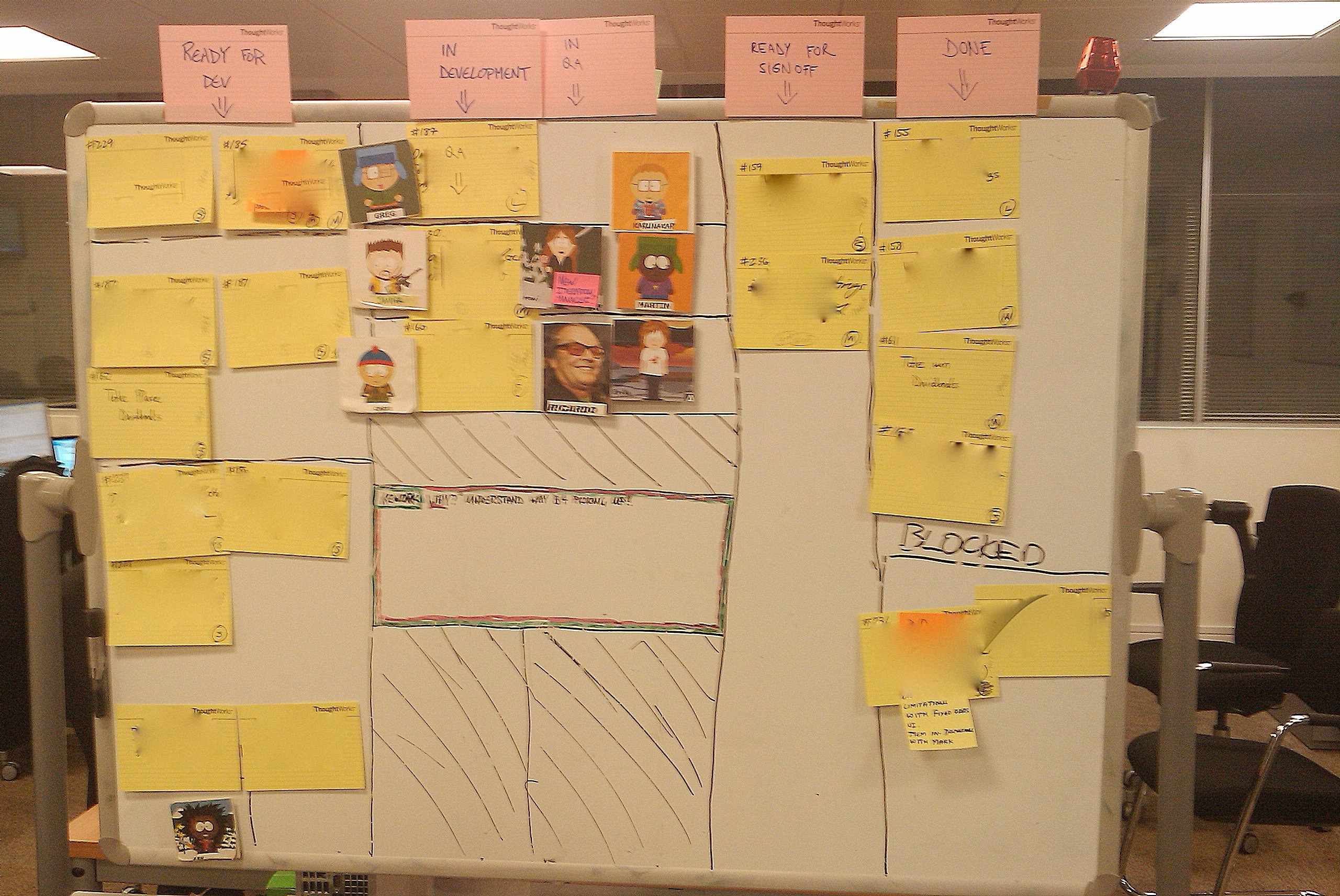
Once all the stories for iteration have been analyzed they are landing in Ready for Development. The team has 6 developers, as we are pairing, we are 3 pairs working on 3 stories at the time. This makes THREE streams of work that could be started at any time. We decided that we will create THREE vertical slots for that THREE pairs. This means that it is impossible to have four stories worked on at any given point in time.

Next, we decided to eliminate QA column. It doesn’t mean that there is no QA, it means that QAs are involved in testing from very beginning. While the story is worked on, every single bit of new functionality is presented to QA to check it out. Developers are getting immediate feedback and very often tips for things that they could miss. In a mean time QAs are testing on their test environment and preparing automated tests.

We have the luxury of heaving one QA per DEV pair. This makes little teams of THREE. When development is finished there is very little for QA to test as it was already done. At the end newly created automated tests are fired up just to confirm that all is done.

As it is a team effort (a DEV pair plus QA) to FINISH the story, DEVS are helping in testing and in development of automated tests when needed. The story goes than into Ready for Sign-Off.

It involved discipline to make sure that only one story is worked on at the time, until entirely finished and being ready for presentation to business sponsor.

The THREE musketeers are responsible for the story to be finished and to improve the process.

Story wall

Revolution

How did this process change affect our project. Short summary.

  • We have completed all the required scope for release, in given time (a little ahead of time)
  • Number of recorded bugs: 1 (fixed few minutes after it was reported)
  • Team morale, GREAT

We are very happy with this setup. What YOU think about it?

Cheers, Greg and the Team

Mixture of technology at Google App Engine (GAE)

For some time now I am developing my little hobby project. It is called F1Dashboard and it contains informations related to Formula 1 (my favorite motor-sport).

F1 Dashboard
F1 Dashboard

Since the site is quite stable now I will share with you some technologies and ideas I used.

Platform

F1Dashboard is build and deployed on Google App Engine (GAE). I started this as an experiment and as a toy project just to learn something new.

GAE is not a new idea, it is another platform for cloud computing. Main difference from others is the Database model. GAE is using a thing called Data Store (Big Table), which is not a normal relational database that anyone used to. There is no schema defined, and querying is impossible without indexing it before. It is something like a massive bag that could store stuff in.

GAE is offered as Python and Java. The later was released long time after Python. It has limited version of JVM environment and a whole bunch of Google services to use. Lots of standard JDK types got repackaged by Google just to limit standard Java functionality, like spawning a Threads.

GAE offers standard Java servlets as web technology. This means that you could use some of the well established frameworks out there. I decided to create one myself of course 🙂 Something simple and not complicated.

Language

I choose Groovy, just because I wonted to learn another dynamic language and I liked the way Groovy did closures.

Patterns

The framework I did follows MVC pattern. It has single servlet entry. Every requested URL is parsed internally and resolved into Controller and Action. I’m using String Template as rendering engine for my views.

All database operations are entirely hidden behind Repositories, and I made it simple to switch from Objectify to Data Nucleus to anything else that comes.

I choose Objectify for its simplicity. If you are starting with GAE I would very much recommend it.

UI

The design is simple and was done by fried of mine Mike from Rosslyn Digital.

I plugged in jQuery Tools for Overlay effect. It also has a nice plugin for picture gallery.

I also added automatic Twitter updates for every message that is updated on a site.

Updates

Site is automatically harvesting for new content from various of Formula 1 related sites. There is also content from Twitter, YouTube and Flickr. It is utilizing GAE cron jobs for that.

I’m trying to gather some ideas for what I can do with the site in near future. If you have an idea, drop me an email. You can also see latest updates on a site at http://blog.f1dashboard.com

Cheers, Greg

Quick Tip: How to setup Time Machine to backup to NAS storage

I was trying to setup Time Machine on my MacBook to create backup on network storage. It seems that by default it is impossible to do it, if you don’t have Time Capsule.

There is a handy command though that gives you permissions to see all types of storage in Time Machine setup.

defaults write com.apple.systempreferences TMShowUnsupportedNetworkVolumes 1

I am able to see my Network Storage in Time Machine now 🙂
Greg

Coder, programmer or developer

Scratch headCoder, programmer or developer

Today I had a conversation with my Wife about the stuff I do at work. I was trying to explain what is my role. After few minutes I got into a pickle. Am I a coder, programmer, developer. Does all those terms mean different things or they all the same?

Taking a step back in my life I tried to analyze all those words according to what I was doing.

Coder

When I left university I was full of theory. Empty words and concepts that I never tried in life. I knew few programming languages and some technics. I had no experience how to deal with people though. Whenever I was in a conversation about next project, feature I was thinking only in technical terms. When I found something impossible to do (as I just never done it before), I said that it is impossible to do. These were old days, and I think I was a coder at that point in my life.

Programmer

When I started my first job, every simple task was a problem. I was asking a million questions all guys that were working there for long time. Needed guidance on everything. After a while I was capable to make some simple technical decisions and not ask anybody. This is when I still was in my little world of code and I didn’t care about reasons behind it.

Developer

This is few years after university. This is the moment when I stopped thinking about programming languages (they are just another tool) and focused on software as a whole. A big role in this was played by people from the company I work for at the moment (ThoughtWorks). As a developer I need to know what is the driver behind the need for feature/software. Why? I need to understand system as a whole, to make proper decisions. It is also possible that the feature or functionality is not really needed or hard (impossible) to implement.

So, coder, programmer, developer. This is how I believe I evolved through my technical life. The labels are still a labels but I find them very useful explaining or just understanding what I was doing.

I believe it is natural for next question to appear, what’s next?

We’ll see 😉

Greg

Year 2009 in a glance

FireworksThis is it. Year 2009 has gone. Other than actually new date in a calendar not much has changed. Still same old. I do hope though that new 2010 will be different. At least I will give it a credit of a doubt for the time being.

What happened to me and my family in 2009?

I spend 5 great months in Sydney, Australia. You can check back my blog to see some of the pictures. Good times in there. Meet lots of new interesting and less interesting people. I got exposure to new perspectives. My family has rested from UK and all UK related problems. Enjoyed nice weather and central Sydney location.

In a mean time when we were in the Oz land our house got totally flooded by water from the loft (water pipe burst in a freezing weather). It also turned out that insurance is not willing to pay us a single penny for that accident.

I tried to dry the house when I took a week off and got back to UK to rescue whatever was left from our house.

In May we returned to a horrible reality (after a week of awesome holidays in Bangkok, pictures also earlier on a blog). Had to settle back in a house that was a huge mess. Stinking and full of dump. All our savings went into repairs.

We are still fighting consequences of a flood but at least house is in a reasonable state now. We also need to buy some furniture (again), as old were rubbished by water.

While in Australia I was working on a .NET project for insurance company. I got my skills polished in JavaScript as well. I think I’m having a second thoughts about JavaScript after hating it for so long.

I spent some time developing F1 Dashboard web site. Formula 1 related site with news, images and videos. While I was developing it I learned and studied different platforms for cloud programming. F1 Dashboard is running on Google App Engine and is written in Groovy (oh, I learned Groovy as well).

After Australia when we came back to UK I didn’t have to much time to go deep into technology and experiment in free time. I got some time on a train to/from work that I devoted to reading. I got into literature about Lean software development (expect more blog entries in 2010 about that).

Bad weather in December ruined our plans of travel to Poland for Christmas holidays and we spent this time in UK.

So, for all of you who are waking up now, near the end of the post.

2009 was shit. I’m happy it is over. Entire year was full of clouds with rarely few sunny spells (metaphor). I hope 2010 will be better and I wish you ALL that it will be better for you.

So, happy new 2010 year and take care.

Greg

Ps. Oh, I forgot to mention recession and Michael Jackson.

The secreat art of learning or … help me, I'm bored

Android

I just picked up new Development exercise. I decided to learn some programming for Android devices. I’m missing a truly great app for my Android handset that I could get for iPhone or desktop app, TweetDeck. This is my driver and my goal.

I spent some time to get to know the platform and the architecture. Reading some very good documentation that Google Android team put together. I downloaded SDK and some tools. Got it setup (turned out to be a trivial task).

So, what do I do now. I know Java, but that’s only 10% of what I need to know to develop for Android. SDK is the next bit. Plus there are some tips and tricks on how to develop for mobile devices.

I opened one of the tutorials on Android page and after a 10 minutes of reading and following on my computer I got bored. I realized that I enjoy to learn most by pairing on a problem with someone who knows more or at least know some. I don’t really have anyone to pair with me on my new task. I figured there has to be a better way of learning then.

Question is … what it is?

Guys, any help? How should I tackle it, so it is not boring as hell?

Cheerios, Greg