Post-Redirect-Get pattern with Grails

In this post I would like to share with you a very common pattern used in web application development and how I implemented the pattern in my Grails application. Let’s start with a simple explanation of the pattern and what is it useful for.

Post-Redirect-Get

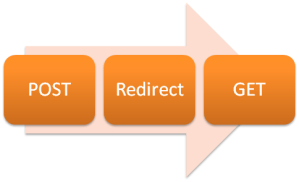
Post-Redirect-Get refers to the flow or process that web applications follow. When user submits the form in the browser the information is typically send with HTTP POST method to a web server. Application processes the information and sends back the response. Response is sent in a form of redirect to another view. Browser loads new state from web server using GET method.

Post-Redirect-Get pattern

Some of the benefits of using this patterns are:

  • Pressing refresh button in the browser will not cause duplicate form submission. The most annoying dialog box asking you if you want to resubmit your form will be gone.
  • Bookmarking result page would be possible.
  • Pages with forms submissions will be gone from your browser history.
  • Nice and clean separation of the HTTP methods that change state of an object (POST, UPDATE, DELETE) from non-destructive, read-only methods (GET).
  • Easier to test response, as all you need to check is the redirection. Typically when form is submitted successfully it will redirect to different page then failed submission. To test the behavior it is enough to test the redirection.

With the pattern in mind and the benefits let us try to look at the concrete FooBar example.

Grails example

I assume you know what Grails is. I’ve created a project and created domain object called Foo. The only property it has is a String, Bar that cannot be blank.

package post.redirect.pattern
class Foo {
  String bar
  static constraints = {
    bar blank: false
  }
}

Foo controller with two methods responsible for creation of new object.

class FooController {
…
def create() {
  def instance = new Foo(params)
  if (flash.model){
    instance = flash.model
  }
  [fooInstance: instance]
}
def save() {
  def fooInstance = new Foo(params)
  if (!fooInstance.save(flush: true)) {
    flash.model = fooInstance
    redirect(action: "create")
    return
  }
  flash.message = "Hooray, you did it!"
  redirect(action: "show", id: fooInstance.id)
}
…
}

When user submits the form and the object is invalid, the browser is redirected back to the form instead of rendering the form with error messages.

There is an extra check to see if user arrived on this page after unsuccessful form submission.

I used flash to store invalid object between pages, so the user could get feedback on what is wrong with provided values.

If you want to try on another example, the easiest way is to create a domain class and generate the scaffolding for it. You can try the browser behavior on generated code.Try refreshing the page after form submission (valid and invalid), try to navigate between pages using Back and Forwards buttons of your browser, try to bookmark the submitted page.

Later, go and modify the code, replace renders with redirects and see browser behavior after that.

Summary

This is all there is to it. It’s rather simple and easy to follow pattern with number of benefits. Grails makes it a doodle to implements,. Have fun redirecting.

Greg

Unit testing Grails controllers with duplicate form submission check functionality

I’ve been doing some Grail 2.0.1 development recently. I like the maturity of framework and the ease of doing things.

One of the things Grails comes with is a simple way of avoiding duplicate form submission. Have a look at the code bellow:

def myControllerMethod(){
  withForm{
    render “theGoodStuff”
  } .invalidToken {
    render “theBadStuff”
  }
}

That’s the controller bit. In your view you need to enable use of that feature by passing useToken parameter to form tag:

<g:form action=”myControllerMethod” useToken=”true”></g:form>

It looks very simple and elegant. However when we would like to test the controller we need to make sure we match the token when calling the method.

Documentation on testing Grails application and this particular functionality contains the way of doing so, however I found it not working with Grails 2.0.1.  Not much was blogged about it so I looked through the mailing lists. I found one trail and a bug report for this issue.

Anyway, to make it work, the piece of documentation from Grails, version 1.4.x explains how to do it, and it works.

In controller test method we need to place this code:

…
def token = SynchronizerTokensHolder.store(session)
params[SynchronizerTokensHolder.TOKEN_URI] = '/myController/myControllerMethod’
params[SynchronizerTokensHolder.TOKEN_KEY] = token.generateToken(params[SynchronizerTokensHolder.TOKEN_URI])

controller.myControllerMethod()
…

Happy testing. Greg

Useful links:

http://grails.1312388.n4.nabble.com/grails-2-0-testing-controller-with-withForm-invalid-notation-td4316150.html
http://jira.grails.org/browse/GRAILS-8504
http://grails.org/doc/1.4.x/guide/9.%20Testing.html
http://grails.org

Automated software release in complex environments

Automating software release might seem like an impossible task in a complex environment. I would like to give you, my dear reader handy tips and tricks for achieving it.

breaking chain

Software journey

Either you know it or not, the piece of software that enables you to read this article went a long journey. It was invented, thought through, designed, developed, tested, fixed and then delivered to you. Software continues to evolve. New functionality is invented, designed, developed, tested, fixed and delivered to you again. This cycle happens over and over again. If it doesn’t the software is dead, and I wouldn’t use it if I were you J

Note the last cycle in the software journey: delivery. I like to call this process Software Release or Unleashing the Software. Release depends on many factors. One of them is software purpose. It is enough to make desktop application available (via web site download for example) so the user can get it and install it on a desktop. Web applications are delivered to a web server.

Release process

Software Release process could be simple or could be very complicated. Lets examine three examples:

  1. Desktop application release could involve copying (perhaps extracting) number of files into known location and perhaps making some changes to saved files (for example user files with configuration and settings in user directory).
  2. Web application release could involve pushing new version of the application to web servers, restarting them, migrating the data stored in database.
  3. Multi tiered enterprise applications could involve stopping a number of services, waiting for suitable services state (for example empty EMS service), migrating the data schemas (for example database migration), re-starting multiple applications, restoring application state, etc.

As you can see complexity of the process could be great. Some steps in the process could depend on another. Other steps could take great amount of time. Sometimes it is impossible to stop part of the application or a service for required release.

Whatever the problematic, time consuming and fragile steps of the release process are, you can be sure that sooner or later, someone will make a mistake during the release, causing downtime or even damage to a system.

That is why it is important to have automated release.

Automated release

My favorite form of automated release is One-Click-Deploy. A tool (script most likely) that will perform all the hard work, with a single user interaction.

Some of the benefits of release automation like this are:

  • Reduced mistakes when performing manual steps
  • No time wasted by a poor soul who have to go through manual process
  • Reusability and simplicity of using the same tool to release into different environments
  • A tool that verifies the release process itself (if something went wrong, it probably means that process needs updating)

Complex environments

Automating in complex environment is even more important then anywhere else. This is due to the fact that it is much simpler to make a mistake while releasing and cause problems. It also reduced the great amount of time consumed by manual steps.

It might be hard to automate release in complex systems. Consider the system I work on my current project.

Large distributed cache makes it difficult to stop the application, as data will be lost. EMS topics are read by database persistence application and fail-safe environment, so we need to wait for the topics to be read entirely. Once everything is stopped we need to roll the new code base to 20 – 40 physical hosts and apply all necessary configurations changes. Persistence layer needs to be migrated to represent Domain correctly. When we restart applications we need to reload it to the previous, valid state (load 300 GB worth of data into distributed cache). That is only a tip of the Iceberg that represents how difficult it could be to automate the release.

There are things that you can do or adopt on a project that would make it much easier for the automation to happen.

Tips and tricks

Tools and deployment environments

Use tools and deployment environments that have accessible API for management.

The environment or the containers that you deploy to should have open API for the management. If you are deploying into web server, you would like to be able to programmatically stop the server deploy new code, perform configuration changes, start it again and validate.

Most of the cloud services contain this kind of API. Typical Java Web containers are manageable via a public API.

If there is no public API but there is a web console for management it is possible to automate via typical Web Testing tool (eg: Selenium, Geb).

If you are starting the project and still have a chance to select appropriate environment, then you are lucky. You can make your life easier by selecting environment with public management API. If you are deep into the project and it is too late, there are always a ways to hack the system. Give it a try.

Use a tool that will be flexible and won’t enforce specific way of working.

Number of times I was on a project where the tool used for a release was enforcing a specific way of working. Instead of being productive in automating release process I was forced to fight it and hack it.

There are better things to automate your release with than XML.

If the tool doesn’t entirely do what you need, wrap it, enhance it or dump it in favor of other.

Many tools that are typically used for deployment are quite flexible and have build in mechanism for extending it. I found that writing a plugin or simply wrapping the tool in another process that controls it’s startup, makes it simpler to use and produces repeatable pattern.

If you are having more trouble with the tool itself or simply can’t get result required, don’t be afraid and dump it. There are always other tools. In a worse scenario you can write something simple and tailored for your specific needs.

Application design

Build your application in a way that will support state persistence and restoration.

It is not only the process and tools that you are creating or going to use that should support the automation; it should be the Application itself.

In the example of a complex environment I provided, I mentioned the distributed cache. If the cache is full of data, releasing new version of application could potentially cause the data to be lost. You need to think of a way to get it back to the previous state. The release process should accommodate for restoring the state from some king of storage (eg. Disk, database, replicated cluster, etc.).

Process

Keep your configuration with your source code.

Having environment configurations collocated with the source code in the source version control system has number of benefits:

  • It could be unit tested.
  • Provides a history of configuration changes. It is always possible to revert to a previous configuration that was working.
  • Configuration lives close to developers, who usually know the most on subject of required configuration changes.
  • Configuration ships with the deployable.
  • It contains a name of a person that modified it, so whenever configuration changes are not clear you can always ask the person who made a change.

Automate every step.

Don’t leave a chance of error creeping into your process by allowing manual steps. It might take some extra effort to automate those simple, little steps but the award is saved time and reliably released software.

Make sure to have everything that application needs to live contained within the release.

Don’t leave anything out: extra libraries, additional software installed, new versions, etc. Ship it all as a part of the release. It doesn’t have to be collocated with a source code (however it is quite beneficial sometimes). Make sure it is accessible from every point you are deploying your software into.

Keep logs, summary and history of releases.

Having release log helps to track the progress of release, identify issues and even test the release itself.  It is also handy when release takes long time and nursing it needs to be handed over to another person.

Summary page helps quickly identify the version of the software released into environment.

Famous last words

I know that sometimes automation might seem impossible but I also believe that impossible doesn’t exist. There is only easy and less easy to do. Automate your release and make your and your comrades life more enjoyable.

Many happy automated releases.

Greg

Summary of 2011

Past

Time for a little retrospective on what I learned during 2011.

Technologies I learned and improved skills in:

  • Gradle – build and release tool.
  • Groovy – dynamic programming language that runs on JVM
  • Coherence – distributed cache
  • Grails – web framework that runs on JVM. Groovy and Spring paired nicely together
  • Gaelyk – another web framework
  • GAE (Google App Engine) – cloud platform from Google
  • Objective-C and iOS development
  • Scala and Clojure, programming languages that runs on JVM

I did some research into Creativity and Motivation that resulted in few posts.

Future

This year I will focus more on functional languages and functional style of programming.

Main target this year for me is the work on GigReflex, Service that I work on with my friend Mike. Service will be deployed on one of the available PaaS cloud services running Grails web application framework.

Bye, bye 2011.

2012, here I come.

Greg

When done is DONE (or not)

Not too long ago I had a conversation with one of the senior member of the management team of project I’m working on. I had some ideas on how can we do things faster by improving our testing (not developer testing but end-to-end, QA and regression testing). After few minutes of conversation I was asked a very basic question: “What is the definition of DONE on our project?” I was just going to open my mouth and jump out with an answer like: “Well, it takes us usually 3 days to develop piece of functionality”, but I stopped. I actually wasn’t sure. We spend few more minutes discussing some other issues but when I left I felt that this question is still on the back of my mind, trying to desperately find the answer.

After number of attempts I decided to rephrase the question. What is the Goal of the project? Couldn’t find a simple answer. So I asked even more general question. What is the goal of the company? I recalled books by Eliyahu M. Goldratt, “The Goal” and “The Race”. “The goal of the company is to make money in the present as well as in the future”. The goal is to win the race for customers.

My team works on creating and maintaining the software that produces the data for other systems within the company. Those systems are used to deal with clients, to provide them with reports, to sell them information, to protect client interests. This means that our project indirectly contributes towards company’s goal.

All the other teams and projects that are receiving data from us are our customers. We should make all the effort to deliver the necessary features to the consumers in a timely manner as they will be use to generate the revenue.

That’s it. This is my understanding of DONE.

In other words:

  • It’s NOT DONE when BA finalizes the requirements and forms them as stories that got accepted by all stakeholders
  • It’s NOT DONE when developer finishes coding the solution and fixes all the bugs
  • It’s NOT DONE when QAs, BAs finish testing and approve the deliverables
  • It’s NOT DONE when Downstream systems receive the data and confirm it’s quality
  • It’s DONE when client receives the service that he or she requested thanks to the piece of software my team delivered. That’s when it’s DONE!

I think there is an important aspect to touch on. It is the effort of the entire team before DONE could be announced. No one should silo himself into a specific role and take responsibility for the specified area only. Developers should help with delivery of tools for release and testing automation, BAs should help with testing, QAs should help to form requirements, etc.

So, next time when you think you’re DONE, think again. Perhaps you are not really there yet but you could help someone else to make it happen.

Wish you all many happy DONEs in the future. Greg

Gradle IDEA plugin, configuration and usage

We are using Gradle as a build and release tool in our project. It’s flexible and does exactly what you expect from it, with no xml configuration magic.
Gradle IDEA plugin gave us a way of generating IntelliJ project and modules files out of the freshly checkout source with a single instruction.

Gradle IDEA plugin

All we needed to do is to include the plugin in out multi project setup and run the gradle idea tasks from the command line.

allprojects {
…
  apply plugin: ‘idea’
…
}

First time when we generated the files they were valid, however the module configurations needed few simple fixes. The IDEA plugins provide hooks into project and module generation that we used to amend the generated IntelliJ files.

Setting the Java version on the project


allprojects {
…
  ideaProject {
    javaVersion = '1.6'
  }
…
}

This code snipped sets version of JDK on the whole project, which in turns makes it ready for compilation in IntelliJ.

Moving module dependencies to the top of the list

Gradle IDEA plugin creates dependencies for all the modules, however it moves the dependencies between modules to the bottom of the list. For example, if module B has dependencies on module A plus some of it’s own JAR dependencies, the JAR will appear before the module A dependency.  It was problematic for our project.  The snippet below is using module configuration hook to reorder module dependencies to the top of the list.

allprojects {
…
  ideaModule {
    whenConfigured { module ->
      def moduleDependencies = []
        module.dependencies.each {
          if (it.class.simpleName == 'ModuleDependency') {
            if (it.scope.equalsIgnoreCase("COMPILE")) {
              moduleDependencies += it
            }
          }
        }
      module.dependencies.removeAll(moduleDependencies)
      def jarDependencies = new LinkedHashSet(module.dependencies)
      module.dependencies.clear()
      module.dependencies.addAll(moduleDependencies)
      module.dependencies.addAll(jarDependencies)
    }
  }
…
}

Adding defaults to Run configurations

We have also discovered that it was useful to add some extra defaults to Run configurations and to TestNG running configurations.

We did this with Idea Workspace hook and a bit of XML injection. Code bellow is the sample snipped we used.


allprojects{
...
  ideaWorkspace {
    withXml { provider ->
      def applicationDefaults = provider.node.component.find { it.@name == 'RunManager'}.configuration.find { it.@type == 'Application'}
      if (applicationDefaults != null) {
        applicationDefaults.option.find { it.@name == 'VM_PARAMETERS'}.@value = '-Xmx1024m -XX:MaxPermSize=256m -Xss64k'
        applicationDefaults.option.find { it.@name == 'WORKING_DIRECTORY'}.@value = 'file://$MODULE_DIR$'
      }
      def testNGDefaults = provider.node.component.find { it.@name == 'RunManager'}.configuration.find { it.@type == 'TestNG'}
      if (testNGDefaults != null) {
        testNGDefaults.option.find { it.@name == 'VM_PARAMETERS'}.@value = '-XX:MaxPermSize=128M -Xmx1024M'
        testNGDefaults.option.find { it.@name == 'WORKING_DIRECTORY'}.@value = 'file://$MODULE_DIR$'
      } else {
        def clonedNode = new XmlParser().parseText( XmlUtil.serialize(applicationDefaults))
        clonedNode.@type = 'TestNG'
        clonedNode.@factoryName = 'TestNG'
        provider.node.component.find { it.@name == 'RunManager'}.append(clonedNode)
      }
    }
  }
...

}

This snippet sets some default JVM parameters and working directory for running configurations.

The snippets made it possible for anyone to quickly get up and running on any clean machine with checked out project sources.

Cheers, Greg

Build script and project level variables (Gradle)

Following on my Introduction to Gradle here is a simple tip on script level variables.

Variables

I found out today that declaring something on the top level of a project build file doesn’t mean that all the Gradle blocks will see it. The problematic one is buildscript {}. It happens as buildscript section is evaluated before any other part of the script is.

So, for example:

myVariable = “I was here”

allProject {
  println “It will be here $myVariable”
}

buildscript {
  println “But it won’t be here $myVariable”
}

Defining variables on top level could be useful as they could be treated as constants and reused throught the script (I use those for repository URLs for example)

The easiest and simplest solution would be to put buildscript{} as a first block and declare all the variables inside.

buildscript {
  myVariable = “I was here”
  println “Here $myVariable”
}

allProject {
  println “.. and here $myVariable”
}

Buildscript block doesn’t have to be at the top but I feel it’s more elegant and clear as all the constants are on the top of the file that way.

Introduction to Gradle

For last few weeks I’ve been moving rather large collection of Ant, Shell and other scripts into Gradle. In my opinion Gradle is great. It has two things that I value the most when it comes to tools:

  1. The build scripts are CODE. As scripts are CODE I can do everything I could do when I code. It gives me freedom from XML
  2. It has dependencies management powered by Ivy.

Scripts are Code

The build scripts are Groovy code. Groovy is dynamic language that runs on JVM (similar to JRuby in some sense).  This means that I can test my build scripts with unit tests. This also means that I can do loops and conditions easier without weird, artificial XML tags.

Dependency management by Ivy

Gradle team, instead of inventing new dependency management, actually decided to use Ivy. Simple and easy tool that does what it says on a tin, nothing more. More important it will not try to download the Internet every time it runs.

The beginnings

First of all, if you would like to follow me with this article, grab yourself installation of Gradle. It is self-contained zip, and the only thing that you would need is Java installed.  Verify your Gradle installation by typing gradle –v from your command line.

Gradle expects your build scripts to be in a project folder in a file called build.gradle. You can write your scripts in another file but every time you execute Gradle you will have to specify where your build script is: gradle –b file_name.gradle.

To execute a task defined in build.gradle file you need to type: gradle taskName.

To see the list of all available tasks in for project type gradle tasks from command line.

Write you some tasks

Gradle has a concept of a task. Task is combined of multiple actions. One can define a task as new and assign some actions to it, or use predefined Types of task (Copy, Exec, etc.).

Example of new task definition:

task doStuff << {
  // Hey hey, I’m doing stuff
  println ‘Doing stuff’
}

Example of task that copies files:

task copySomeThings(type: Copy) {
  from ‘source’
  into ‘destination’
}

There is a very subtle difference between those two ways of defining tasks, and I got caught many times by it. The first task, doStuff doesn’t have predefined functionality. Calling method task doStuff creates task with name doStuff. However, I need to define some actions. This is the role of operator << (shift left). What actually happens is:

  1. Task doStuff is created
  2. Action that is defined in closure (between two curlies, {}) is appended to the end of the actions list of this task.  First and only action that will happen will be printed out into STDOUT.

If I need another action to follow the thirst one I defined I could do:

doStuff << {
  // Wow, now I’m doing another action
  println ‘Weheeeey’
}

The definition of copy task however doesn’t contain << assignment. It does contain the closure though. This closure is passed into the task Copy to configure it. from and into are methods defined on task type Copy that can be used to specify where to pick up files from and where to drop them. Every predefined task has some parameters and methods that I can specify. Please refer to documentation  (link to Gradle task list) for details of task.

This is important

The most common mistake I kept on making was defining a custom task and forgetting the << operator. The task did nothing and I was spending countless hours investigating why.

task doStuff(){
  // this will not happen
}

Task dependencies

In Gradle I can define dependencies between tasks. This means that when I want to execute specific task and there is another one that needs to be executed before it, Gradle will execute it too. The way to define task dependencies:

task doStuff() << {
  // I’m doing stuff
}

task doingEvenMore(<strong>dependsOn: doStuff</strong>) << {
  // Doing more
}

You can also specify name of the task instead of the task reference. This allows for kind of a lazy evaluation of build script.

task doingEventMore(dependsOn: ‘doStuff’) << { }

If you need to add dependency for already defined task you can use dependsOn method of a task.

doingEvenMore.dependsOn someOtherTask

Or dependsOn property of a task:

doingEvenMore.dependsOn = [doStuff, someOtherTask]

There is a catch with the last method: it overrides all previously created dependencies.

Then, there was Java

As of now I was describing how to create tasks and declare dependencies between them. To actually use it on a project we will need some more action. That’s why it is time to introduce Gradle Java plugin.

apply plugin:’java’

Java plugin adds some task to your build. You can check them out by executing gradle tasks from command line. Tasks that can compile, test and even jar your project.

What we are interested in are dependencies that project might need and the way Gradle handles them. By dependencies I mean third party libraries like: log4j, junit, etc. You can see dependencies in your project by executing gradle dependencies from command line.

Dependencies

Java plugin adds few dependency configurations. I’m interested in compile time dependencies, as it is needed for my project to compile and run.

apply plugin:’java”

repositories {
  mavenCentral()
}

dependencies {
  compile group: ‘log4j’, name:’log4j’, version: ‘1.2.9’
}

Inside repositories block I used method mavenCentral(). This is method predefined by Java plugin providing access to Maven central repository. As I mentioned earlier Gradle uses Ivy to resolve dependencies. Ivy in turn works rather well with Maven repositories.

Lines above will add single log4j dependency to mine project. The cool thing about it is that it will also resolve all its dependencies.

We can also add multiple dependencies by doing:

dependencies{
  compile(
    [group:’log4j’, name:’log4j’, version:’1.2.9’],
    [group:’xfire’, name:’xfire’, version:’1.2.6]
  )
}

This will add two dependencies to my project.

There are few more dependencies (runtime, compile, testCompile, testRuntime, archive) added by Java plugin. Dependencies are nothing more than a list of libraries (files) included in a build lifecycle (compile, test etc).

Configurations

One can define its own dependency configuration by creating new entry in configurations block of a build script.

configurations {
  gregWasHere
}

dependencies{
  gregWasHere group: ‘log4j’, name:’log4j’, version: ‘1.2.9’
}

Configurations are nice and simple way of adding compiletime or runtime libraries to any build. For example I used it when executing external Java process that needs extra libraries in classpath.

task executeSomeJava(type: JavaExec){
  main = “com.some.main.Bla”
  args = [“1”, “2”]
  classpath = configurations.gregWasHere
}

Summary

Gradle is really great and if you are still stuck in the world of XML and hate it, give it a try. Few tips I written in this article, could be used as a good starting point. I also found that coding to task convention that Gradle uses, simplifies the build and release process.

Few good resources to read when starting with gradle:

Broken Maven repository and Gradle dependencies

Few days ago I got into trouble when building project using Gradle.

Created deployables (fat jars) looked fine when I build it on my local machine, however when I build on remote box (Linux) I was missing some dependencies. The build scripts were exactly the same. The only difference was: the remote box didn’t have local Maven repository. This shouldn’t cause any problems as remote repository should be the same.

Gradle, a better way to build

However 🙂 on the project that we are working, the remote repository is managed by team and it is in our internal network. It also doesn’t proxy to Maven repository.

Some of the artifacts that got uploaded to that repository were missing pom files. When Gradle (via Ivy) was resolving the dependencies it created pom file on the fly with no dependencies on other artifacts.

When I discovered the problem I uploaded missing pom files. It didn’t fix the problem though. As it turns out, Ivy cached the self created pom files in USER_HOME/.gradle/cache folder. Running gradle with -C rebuild option doesn’t solve the problem as this option only clears the cached Gradle scripts.

When I deleted the folder USER_HOME/.gradle/cache, Gradle got all the dependencies resolved properly!

I was using Gradle milestone 3.

I hope you won’t get stuck on the similar problem as I did. Maintain you repository or use public.

Greg

Design release process from very beginning

Creating good software that meets customer expectations is 50% of success. The other 50% is getting it to the customer in a most quick, easy and smooth matter as possible. This process is called releasing software.

breaking chain

Release flavours

Releasing software comes in two flavors, one is a clean slate installation, second is version/maintenance upgrade. Where first one is rather simple the latter could be quite problematic. The more complex the application and environment it runs in, the more problematic it’ll be.  Releasing software to running cluster of application servers with data migration and without downtime could prove challenging for the toughest release gurus.

I always thought of release in a same way I receive or send parcel. When I have something to sell I organize it online, Delivery Company comes to pick it up and it’s on its way. I can then track it online to see the progress my parcel is making.

It is exactly how I would like any release process to be. When my package (new version of software) is ready I would like to press the button and have it on its way. All I should do is monitor if something went wrong and what if it did.

Automation

Automation of the process is a must if one wants to remove wasted time on same repeatable steps. It is quite often automation that gets neglected from the beginning of software life, until the point when release becomes unmanageable manual monster.

Automation should actually be planned from the very beginning. Whenever I start to work on a project I ask myself what do I need to do to get the software to end user as quick as it’s ready with as less possible effort. This is the beginning of the release automation adventure.

Releasing often and quickly adds into the whole iterative development process, combining the whole as one iterative delivery. Process reduces time that takes for the requirement to reach end user as a piece of functionality. That makes end user happy and gives way to feedback. Software development team can use feedback to adapt and evolve the software.

So, what now?

It is important to design and implement release process from the beginning. It is also important to automate it. It will make it possible to ship as soon as piece of work is done. I know of teams where releasing is happening on a daily basis.

Automate every step that requires human interaction. Look for candidates in places where the only manual thing is pressing a button or running a script.

If release process requires monitoring (e.g. waiting for application to stop before continuing release process), try to automate that as well.

I also found that usage of tools that support coding the process, not configuring it via XML, works much better and are more flexible and easy to use.